Band leaders
Busy dates, holds and the waitlist
When several clients want the same date, see them side by side and follow up with the strongest first. Hold a date for someone, and offer it to the next person if it frees up. The first to sign and pay gets the date.
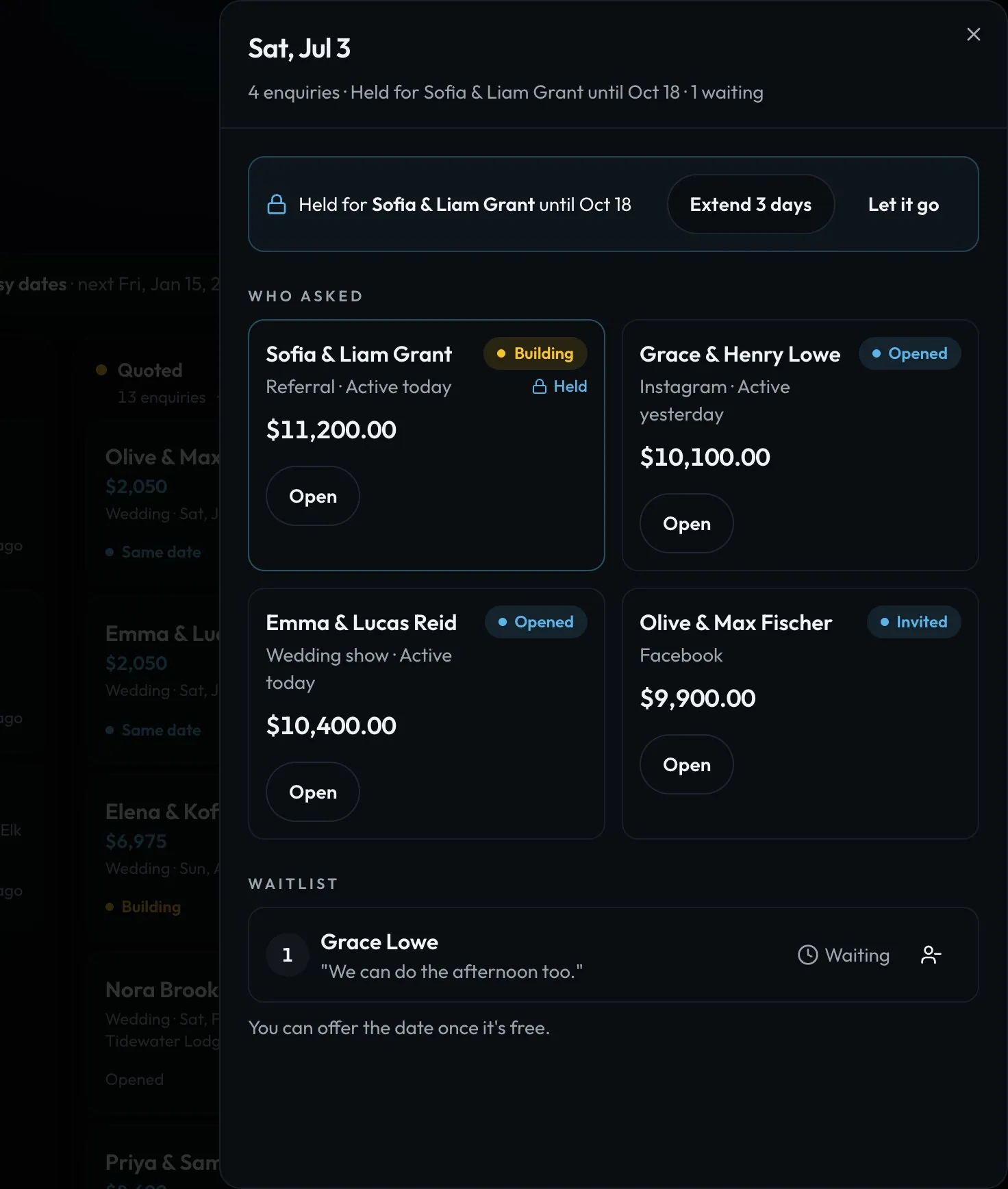
Swipe sideways to see the whole screen. Tap a number for its tip.
- Side by sideStage, value, source and when they were last active.
- The holdExtend it or let it go.
How to
- Tap a date in Busy dates (a row on Home and Enquiries, or on Calendar).
- Compare who asked: how far along they are, the value and the source.
- Hold the date for one client. They see "We're holding Jul 3 for you until…". Others see it's held and can join the waitlist.
- When a hold ends or a booking is cancelled, Needs you says "Jul 3 is free: 2 on the waitlist". Tap Offer to the first person. Nothing is sent without your tap.
- When a date is booked, Needs you helps you let the others know kindly.
Tip
Tip
Clients only see "This date is popular" when another client really is asking. No numbers, no countdown.